
A Shark robot vacuum is supposed to make cleaning easier, not become another frustration in your home. But when your trusted cleaning machine won’t power on, whether it’s a upright model or a robotic unit, that’s when the real headache begins. The good news? Most of the time, a Shark vacuum won’t turn on due to fixable issues that don’t require a professional visit. Dead batteries, clogged filters, tripped safety switches, and charging port problems are among the most common culprits. Before you assume your vacuum needs an expensive repair, work through these practical troubleshooting steps that address why your Shark vacuum is not working and get your cleaner back in business.
Table of Contents
ToggleKey Takeaways
- Most cases of a Shark vacuum not turning on can be fixed without professional help by checking the power source, charging port, battery, and safety switches.
- Clean the charging dock and vacuum’s metal contact points with a dry cloth, and ensure the dock is plugged directly into a wall outlet rather than an extension cord for consistent power delivery.
- Let your Shark vacuum charge for a full 8–12 hours if the battery is completely drained, as some rechargeable batteries require an extended initial charge to accept a full charge cycle.
- A clogged filter or dust bin triggers automatic safety shutoffs to prevent motor damage; empty the bin completely and inspect the filter by holding it up to light to detect blockages.
- If your Shark vacuum still won’t turn on after troubleshooting, perform a factory reset using the reset button (location varies by model) or remove and reinstall the battery, then contact Shark customer support with your model and serial number.
- Shark vacuums typically carry a 5-year limited warranty on the motor and 2-year warranty on the battery, so check eligibility before paying for repairs.
Check the Power Source and Charging Port
The simplest fix is often the right one. If your Shark robot vacuum wont turn on, start by verifying the outlet itself is live. Plug a lamp or phone charger into the same outlet, if it powers up, you’ve ruled out a dead circuit.
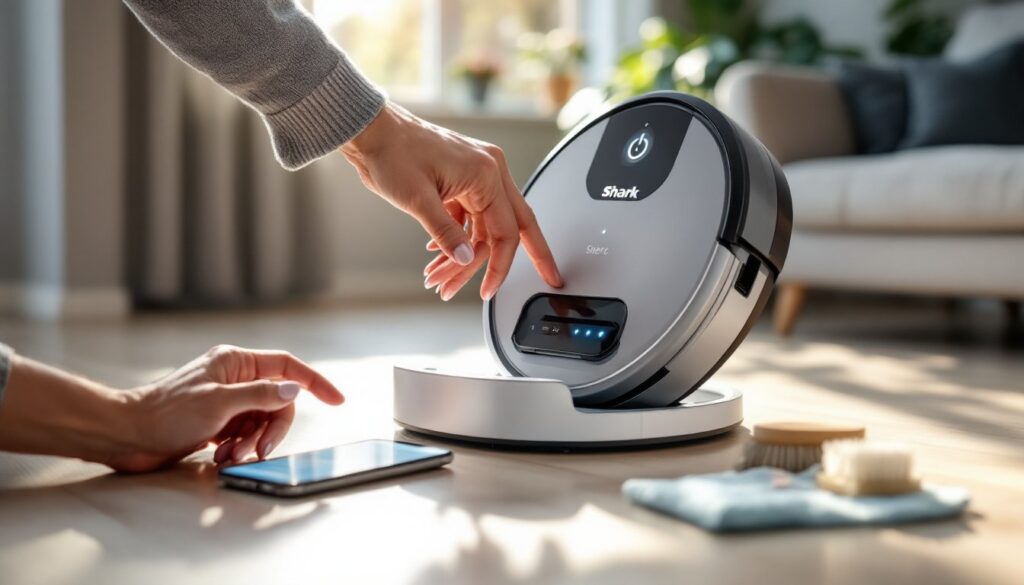
Next, examine the charging dock and charging contacts on your vacuum. Look for debris, dust, or corrosion on the metal contact points where the vacuum sits. A thin layer of dust can block the electrical connection entirely. Wipe both the dock contacts and the vacuum’s charging contacts with a dry, lint-free cloth. Make sure the dock is plugged in, the power indicator light (usually blue or green) is on, and the outlet isn’t controlled by a wall switch that someone may have turned off.
If you’re using an extension cord, try plugging the dock directly into a wall outlet instead. Some extension cords don’t deliver consistent power to charging devices, especially if the cord is old or damaged. Move the vacuum away from the dock, wait a few seconds, and then place it back on the charging station. Listen for any beeping sounds or watch for LED indicators that signal the charging cycle has begun. This simple reset often restores the power connection.
Inspect the Battery and Power Button
Verify the Battery Is Fully Charged
If the charging dock is working but your Shark vacuum stopped turning on, the battery may be completely drained. Let the vacuum charge for a full 8–12 hours on the dock without interruption, yes, even longer than the recommended time if the battery was severely depleted. Some rechargeable batteries need an extended initial charge to accept a full charge cycle.
During charging, look for indicator lights on the dock and the vacuum itself. Different Shark models use different light patterns: some show a solid light when charged, others pulse or change color. Consult your manual for your specific model’s charging indicators. If you don’t have the manual handy, Shark’s website offers downloadable PDFs for most models.
If the vacuum still won’t power on after a full charge cycle, the battery itself may be faulty. Shark robot vacuum batteries typically last 2–3 years with regular use. If your vacuum is older and has been in regular service, battery replacement might be necessary.
Test the Power Button for Defects
The power button can stick or fail, especially on models that see heavy use. Press the power button firmly and listen for a click or tactile response. If the button feels mushy, stuck, or produces no feedback, it may not be making proper contact inside the unit.
Try pressing the button repeatedly, 5–10 times in quick succession. Sometimes a sticky button responds to deliberate, firm presses. On robot models, also check the dock’s power button (if equipped), some docks have their own on/off switch. You may be trying to power on the vacuum when the dock itself is turned off. Why your shark vacuum not working might simply be that the dock’s power switch got flipped accidentally by a family member or pet.
Clear Blockages and Dust Buildup
A clogged filter or dust bin can trigger a safety shutoff, making your shark vacuum motor reset automatically. This is a built-in protection to prevent motor damage and overheating. Start by emptying the dust bin completely, even if it looks only half-full.
Next, inspect the filter. Depending on your model, this may be a HEPA filter, foam filter, or mesh screen. Hold it up to a light source. If you can’t see light passing through the filter material, it’s clogged. Tap the filter gently against the inside of a trash can or sink to dislodge built-up dust. For stubborn debris, use a soft brush or an old toothbrush to gently brush the filter material. Never wash the filter under running water unless your manual specifically says it’s washable, some filters are damaged by water exposure.
Check the vacuum’s air pathway for blockages. Remove the filter and look inside the filter chamber. Hair, pet fur, and debris often wrap around internal components. Use a flashlight to get a clear view. Remove any visible clogs with tweezers or needle-nose pliers. Also inspect the brush roll on upright models, hair and string frequently wrap around the roller, which can trigger an obstruction sensor and prevent startup. Turn the vacuum on its side, locate the brush roll, and use scissors to carefully cut away tangled hair.
Once you’ve cleared blockages, reinstall the filter, fill the tank if it’s a cordless model, and try powering on again. Many shark vacuum will not turn on cases resolve once the airflow is restored and safety sensors reset.
Reset Your Shark Vacuum
A full reset clears error codes and restores factory settings. The location of the shark vacuum reset button varies by model, so this step requires checking your manual or Shark’s support site for your specific vacuum type.
On most upright Shark models, the shark vacuum reset button location is on the motor housing near the handle or the filter chamber. It’s typically a small, recessed button labeled “Reset.” To perform a shark motor reset button procedure, press and hold this button for 5–10 seconds until you hear a beep or see the lights flash. Then release and wait 30 seconds before attempting to power on again.
On robot models, some have a reset button on the underside or inside the dust chamber. Others require a soft reset: remove the battery (if removable), wait 30 seconds, and then reinstall it. For models with non-removable batteries, try this: plug the dock in, place the vacuum on the dock, and leave it untouched for 10 minutes. Then attempt to power on manually.
If you’re unsure where the shark vacuum reset button is on your model, visit Shark’s official support page or download the user manual for your specific model number. Many recent models also include a reset option in the companion app (for connected vacuums). A factory reset won’t erase stored maps or settings on robot models, it simply clears temporary error states that may be preventing startup. How to reset shark vacuum varies by generation, so don’t guess: use the documentation for accuracy.
When to Contact Shark Customer Support
If you’ve worked through all the steps above and your shark vacuum will not turn on, it’s time to involve the manufacturer. Document what you’ve tried: charging time, any error codes or LED patterns, cleaning steps performed, and whether the vacuum ever turned on before this issue.
Contact Shark customer support through their official website with your vacuum’s model number (found on the back or underside of the unit) and serial number (usually on a sticker inside the dust chamber). They can often identify issues remotely based on your description and may authorize a warranty replacement or repair if the vacuum is still under coverage.
Many Shark vacuums carry a 5-year limited warranty on the motor and a 2-year warranty on the battery. If your unit is within these windows, don’t pay out of pocket for repairs, Shark typically covers failures caused by manufacturing defects. For units outside the warranty period, ask about repair costs and expected turnaround time before committing.
You can also consult independent troubleshooting resources for additional guidance. Comprehensive Shark vacuum troubleshooting tips and guides often provide model-specific solutions that address power issues. Similarly, detailed Shark vacuum troubleshooting guides from home care sites cover common failures like the shark vacuum motor reset procedures and battery diagnostics. One more resource worth checking is the dedicated Shark vacuum troubleshooting, which walks through power cord inspection and charging dock diagnostics step-by-step.